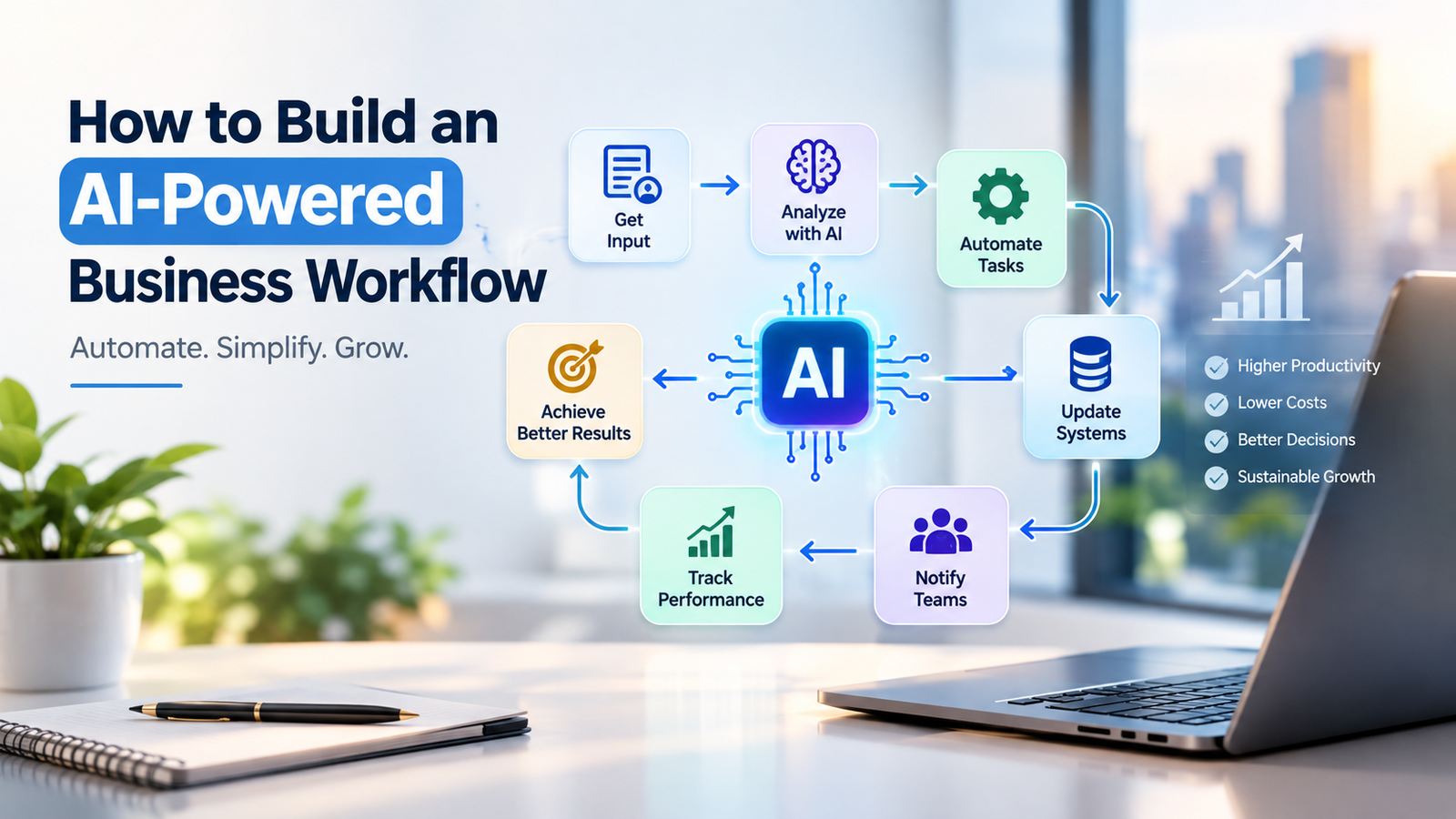
Businesses today are under constant pressure to improve productivity, reduce operational costs, respond faster to customers, and manage growing volumes of information. Traditional workflows that depend heavily on manual data entry, repetitive communication, spreadsheets, and disconnected software can make these objectives difficult to achieve. This is where an AI-powered business workflow can create significant operational improvements.
An AI-powered workflow combines artificial intelligence, automation tools, business applications, and predefined processes to complete repetitive activities with minimal human intervention. Instead of employees spending hours performing routine tasks, AI can help organize information, generate content, analyze data, qualify leads, answer common customer questions, and trigger actions across different platforms.
However, building an effective AI workflow is not simply about adding an AI tool to an existing process. Businesses need to understand their current operations, identify suitable automation opportunities, choose appropriate technologies, establish human oversight, and continuously measure performance.
What Is an AI-Powered Business Workflow?
An AI-powered business workflow is a structured process in which artificial intelligence and automation technologies are used to perform, support, or optimize business tasks.
A conventional workflow might require an employee to receive a customer inquiry, read the message, enter customer information into a CRM, categorize the lead, send a response, and notify the sales team.
With an AI-powered workflow, many of these steps can be automated. AI can analyze the incoming inquiry, identify the customer's intent, extract relevant information, update the CRM, categorize the lead, generate an appropriate response, and notify the responsible team member.
The employee can then focus on higher-value activities such as building relationships, negotiating with prospects, or solving complex customer problems.
Why Businesses Are Adopting AI-Powered Workflows
AI-powered workflows are becoming increasingly relevant because businesses generate large amounts of data and communication every day. Employees may spend considerable time handling repetitive administrative activities that do not necessarily require manual decision-making.
Automation can help businesses streamline these processes while allowing employees to concentrate on strategic and creative work.
Some potential benefits include:
- Reduced repetitive manual work
- Faster business processes
- Improved operational efficiency
- Better customer response times
- More consistent processes
- Improved data organization
- Faster access to business information
- Reduced human errors in repetitive tasks
- Better employee productivity
- Greater scalability as the business grows
The actual results depend on the workflow, technology, implementation quality, and level of human involvement.
Step 1: Identify Repetitive Business Processes
The first step in building an AI-powered business workflow is understanding where your business currently spends time.
Do not start by asking, “Where can we use AI?” Instead, start by asking, “Which business processes are repetitive, time-consuming, and suitable for automation?”
Common examples include:
- Lead collection
- Customer support
- Email management
- Appointment scheduling
- Data entry
- Invoice processing
- Sales follow-ups
- Social media content workflows
- Report generation
- Document processing
- Customer feedback analysis
- Internal notifications
Create a list of repetitive processes and document how each one currently works.
For example:
Current process:
Lead receives inquiry → Employee reads inquiry → Information is entered into CRM → Lead is categorized → Salesperson is notified → Follow-up email is sent.
This gives you a clear starting point for automation.
Step 2: Map the Existing Workflow
Before automating a process, map each step from beginning to end.
Identify:
- What triggers the workflow?
- What information enters the process?
- Which tasks are performed manually?
- Which decisions need to be made?
- Which software applications are involved?
- Where does the process slow down?
- Where are errors commonly made?
- Where is human approval required?
- What should happen when something goes wrong?
For example, an AI lead-management workflow could look like:
Website Form → AI Lead Analysis → CRM Update → Lead Scoring → Sales Notification → Personalized Follow-Up → Human Sales Interaction
This visual structure makes it easier to determine which activities should be automated and which should remain under human control.
Step 3: Decide Where AI Is Actually Needed
Not every workflow requires artificial intelligence.
Some tasks can be handled using simple automation rules. For example:
If a customer submits a form → add the customer to the CRM.
AI becomes more useful when a workflow requires understanding, classification, prediction, summarization, content generation, or analysis.
Examples include:
- Understanding customer messages
- Classifying leads
- Summarizing documents
- Generating personalized responses
- Extracting information from unstructured documents
- Analyzing customer feedback
- Categorizing support tickets
- Generating business reports
- Identifying patterns in large datasets
A strong AI strategy therefore combines traditional automation with AI capabilities rather than using AI for every task.
Step 4: Choose the Right AI Tools
Once you identify the workflow, determine which technologies are required.
Depending on the process, an AI-powered business workflow may include:
- AI assistants
- Chatbots
- CRM platforms
- Workflow automation platforms
- Document-processing tools
- Customer-support systems
- Analytics platforms
- Communication applications
- Databases
- APIs
- Generative AI models
The right technology depends on the business objective.
For example, a company looking to automate customer inquiries may require a chatbot connected to its website and CRM. A sales team may need AI-assisted lead qualification and automated follow-up. An accounting department may benefit from automated document extraction and invoice processing.
The goal should be to select technology based on the workflow requirement, rather than choosing a tool simply because it is popular.
Step 5: Connect Your Business Applications
Many businesses use several applications to manage different parts of their operations. The real value of workflow automation often comes from connecting these systems.
For example:
Website → CRM → AI → Email → Sales Team
When these applications communicate with each other, information can move automatically from one stage to another.
Consider a customer submitting a request through a website. Instead of an employee manually transferring the information into the CRM, the workflow can automatically create a customer record. AI can then analyze the request and determine its category. The system can send the relevant notification to the appropriate department.
This reduces unnecessary manual data movement.
Step 6: Add AI Decision-Making
One of the most useful features of AI-powered workflows is the ability to analyze information and support decisions.
For example, an AI system can analyze incoming leads based on information such as:
- Industry
- Company size
- Customer requirements
- Geographic location
- Product interest
- Previous interactions
- Engagement behavior
The system can then classify leads into predefined categories.
For example:
High-priority lead → Notify sales immediately
Medium-priority lead → Add to follow-up sequence
Low-priority lead → Add to nurturing campaign
This allows teams to organize their time more effectively.
However, businesses should carefully validate AI-generated decisions, particularly when they can significantly affect customers, employees, finances, or access to services.
Step 7: Keep Humans in the Loop
Automation should not necessarily mean removing humans from the workflow.
A well-designed AI-powered business workflow should determine which tasks AI can perform independently and which tasks require human approval.
For example:
AI handles:
- Data classification
- Information extraction
- Routine summaries
- Basic customer queries
- Draft responses
Human handles:
- Complex customer complaints
- Sensitive decisions
- Important negotiations
- Strategic decisions
- Exceptions and unusual cases
This approach can combine the speed of automation with human judgment and accountability.
Step 8: Test the Workflow Before Full Deployment
Never deploy an AI workflow across an entire organization without testing it.
Start with a small pilot.
Monitor:
- Accuracy
- Processing time
- Error rates
- Customer responses
- Employee feedback
- Automation failures
- Cost per task
- Human intervention requirements
Suppose an AI customer-support workflow is designed to answer frequently asked questions. Initially, allow it to handle a limited percentage of inquiries while employees review the results.
If the workflow performs reliably, gradually expand its usage.
Step 9: Establish Data and Security Controls
AI workflows often process business and customer information. Therefore, data protection should be considered during the design stage rather than after deployment.
Businesses should establish clear rules regarding:
- What data can be processed by AI
- Who can access the information
- Where data is stored
- How long information is retained
- Which systems can exchange data
- What information requires human approval
- How access permissions are managed
Businesses should also review the privacy, security, retention, and contractual terms of any third-party AI service before connecting sensitive information.
Step 10: Measure Workflow Performance
After implementation, measure whether the workflow is actually improving the business process.
Useful metrics may include:
Time Saved
Measure how much employee time is saved after automation.
Processing Speed
Compare the time required before and after implementation.
Error Rate
Track whether automation reduces repetitive data-entry or processing errors.
Cost
Calculate the operational cost of running the workflow.
Conversion Rate
For sales workflows, measure whether automation affects lead engagement and conversion.
Customer Satisfaction
For customer-service workflows, monitor response quality and customer feedback.
Human Intervention
Measure how often employees need to correct or take over AI-generated actions.
These metrics can help businesses determine whether an AI workflow is producing measurable operational value.
Practical Example of an AI-Powered Business Workflow
Consider a growing digital marketing company that receives leads through its website.
Its traditional process might look like this:
Website Inquiry → Manual Review → Manual CRM Entry → Lead Assignment → Email Follow-Up → Sales Call
An AI-powered workflow could transform the process into:
Website Inquiry → Automatic CRM Entry → AI Lead Classification → Lead Scoring → Automated Notification → Personalized Follow-Up → Sales Team Review
In this workflow, AI does not replace the sales team. Instead, it reduces repetitive administrative work and helps sales employees receive organized information faster.
The sales representative can then spend more time communicating with qualified prospects instead of manually processing every inquiry.
Common Mistakes to Avoid
Businesses should avoid automating a poorly designed process. Automation can make an inefficient workflow faster without necessarily making it better.
Some common mistakes include:
Automating everything at once: Start with a manageable workflow rather than attempting to automate the entire organization.
Using AI where simple automation is enough: A basic rule may be more reliable and cost-effective for straightforward tasks.
Ignoring data quality: Poor input data can lead to poor AI outputs.
Removing human oversight: Some decisions require human review, especially when errors could have significant consequences.
Choosing tools without integration planning: AI tools should fit into the existing technology ecosystem.
Failing to monitor results: AI workflows should be reviewed and improved continuously.
How AI Workflows Can Support Business Growth
A well-designed AI-powered business workflow can support growth by allowing organizations to handle more work without increasing manual effort at the same rate.
For example, automated lead management can help sales teams process more inquiries. AI-powered customer support can help answer routine questions quickly. Automated reporting can give managers faster access to business information. Content workflows can help marketing teams organize and accelerate repetitive content-related tasks.
The broader objective is not simply to “use AI.” The objective is to create faster, smarter, and more manageable business processes.
Future of AI-Powered Business Workflows
As artificial intelligence continues to develop, business workflows are likely to become more connected and capable of handling increasingly complex tasks. AI agents, intelligent assistants, predictive analytics, natural-language interfaces, and automated decision-support systems can become components of larger business processes.
However, successful AI adoption will depend on more than technology. Businesses will need clear processes, reliable data, appropriate governance, employee training, and continuous performance monitoring.
Organizations that approach AI as a business-process improvement initiative rather than simply a technology experiment can build workflows that are more practical, measurable, and scalable.
Conclusion
Building an AI-powered business workflow starts with understanding the existing business process and identifying repetitive activities that can be improved through automation and artificial intelligence. From mapping workflows and selecting the right tools to integrating applications, maintaining human oversight, protecting data, and measuring performance, every stage contributes to the success of an AI automation strategy.
The best approach is to begin with one practical workflow, test it on a small scale, measure its results, and improve it over time. Whether the objective is improving sales operations, customer service, marketing, administration, or data management, AI-powered workflows can become an important part of modern digital business operations when implemented thoughtfully.